You have one phone. You need two WhatsApp lives. One for the people who actually know you, and one for the business you run, the side hustle you started, or the customers who should not have your personal number mixed in with everyone else.
For years the answer to this was a mess of workarounds. Clone apps. Parallel Space. A second cheap phone sitting in a drawer just for one app. Dual SIM settings buried three menus deep that half worked depending on your phone model.
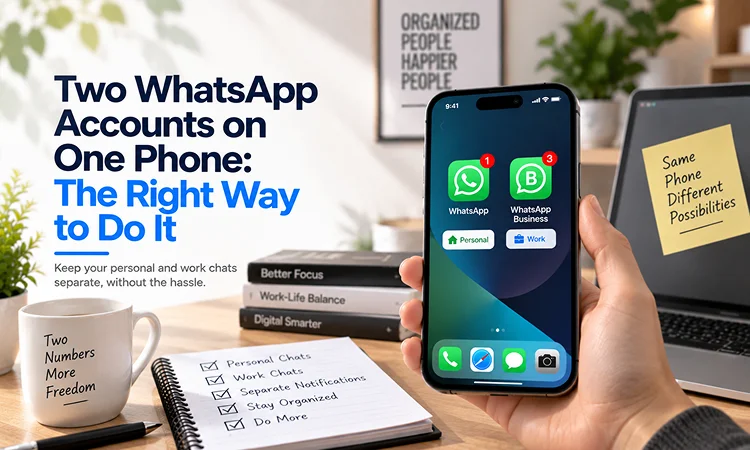
That changed properly in 2026. WhatsApp now lets you run two accounts inside the same official app, on iPhone and Android both. No cloning, no third party tools, no second phone needed for the app itself.
There is still one thing the official method cannot get around, and it is the part most guides gloss over. You need a second number. That requirement has not gone anywhere. What has changed is everything around it.
The Official Way: WhatsApp’s Native Multi Account Feature
This is the method to use first, before anything else on this page. WhatsApp built this properly, it is free, and it carries zero risk of your account being flagged or banned, which is a real risk with some of the older workarounds.
Open WhatsApp. Go to Settings, then Account. Tap Add Account. Enter your second number, verify it with the code sent to that number, then set up the profile for that account. From that point on, switching between your two accounts is a tap inside the app. Your profile picture in the bottom tab tells you at a glance which account is currently active, so there is no confusion about which line you are messaging from.
This works the same way on iPhone and Android now. WhatsApp’s own blog confirmed the iOS rollout in 2026, closing the gap that for years meant Android users could do this natively while iPhone users could not.
Each account keeps its own settings completely separate. Different profile picture, different notification preferences, different privacy settings. Messages, calls, and chat history for each account stay in their own space. You are not logged into one fake version of WhatsApp pretending to be two accounts. These are two real, fully functioning accounts living on the same device.
The One Requirement That Has Not Changed: You Need a Real Second Number
Here is the part that catches people out. The official multi account feature is excellent. But it still requires a second phone number to register the second account, because WhatsApp’s entire system is built around one number equals one account.
This is where most guides send you toward dual SIM phones, eSIMs, or a second physical SIM card, which works but is not always practical. Not every phone supports a second SIM. Not everyone wants to pay for a second mobile contract just to run a business WhatsApp. And buying a second SIM just to register one app is a fairly heavy solution for what is, underneath it, a fairly simple problem.
This is also where a lot of people reach for a free VoIP number instead, and this is the part worth knowing before you do. WhatsApp applies fairly strict filtering against numbers that look like generic internet based VoIP numbers rather than real mobile numbers. Several providers in this space openly state that their virtual numbers do not reliably pass WhatsApp’s verification, which means you can go through an entire signup only to have the verification code rejected or never arrive at all.
A second number that is built to behave like a genuine mobile line avoids this problem. It receives the OTP exactly as a real phone would, registers cleanly, and then sits inside WhatsApp’s official multi account feature exactly the way a second SIM would, without needing a second SIM. You can see how Second Line Number is built for exactly this kind of verification on our features page.
Why This Matters Beyond Just WhatsApp
The instinct to keep one number for everything is understandable. It feels simpler. One number to remember, one number to give out, nothing to juggle.
But the same number sitting across your personal contacts, your business listings, your online signups, and your WhatsApp Business profile is also the same number that ends up everywhere if any one of those contexts goes wrong. A customer who has your business WhatsApp also effectively has a way to find your personal accounts if your number happens to be reused or saved anywhere personal.
We cover this exact pattern in more depth in our blog on why using one phone number for everything is dangerous. A second number for your business or side hustle WhatsApp is not just a workaround for an app limitation. It is a genuine separation between two parts of your life that probably should not overlap as much as they currently do.
Other Methods People Use and Where They Actually Make Sense
The native feature covers most people completely. But it is worth knowing the other methods and exactly when they are the better fit, since not every situation is the same.
WhatsApp Business app alongside regular WhatsApp is still a solid option if you specifically want business features like automated replies, labels, and a business profile, rather than just a second personal style account. It installs as a fully separate app, registered with its own number, and runs alongside your main WhatsApp without interfering with it.
Manufacturer app cloning, such as Samsung’s Dual Messenger or similar features on Xiaomi and other Android phones, can stretch you to a third account when combined with WhatsApp Business and the native multi account feature. This is useful specifically if you have outgrown two accounts but do not yet need full business infrastructure.
Browser based and antidetect setups exist for people running many accounts at once, typically agencies or businesses managing client communications at scale. This is a genuinely different use case from someone wanting a clean personal and business split, and it comes with more complexity than almost anyone outside that specific situation needs.
For nearly everyone reading this, the native multi account feature paired with a reliable second number covers the entire need without any of the complexity in that third category.
A Practical Setup for Personal and Business Separation
If you are setting this up for the first time, here is the order that causes the least friction.
Get your second number sorted first, before you touch WhatsApp at all. If you are using a second number app, set it up and confirm it can receive a text message successfully before relying on it for verification.
Open WhatsApp, go to Settings, then Account, then Add Account, and enter that second number when prompted.
Set the profile picture for the new account to something visually distinct from your personal one. This sounds minor but it is the single biggest thing that prevents you from accidentally replying to a customer from your personal account, or sending a personal message from your business line.
Go through notification settings for the new account separately. Many people keep their business account on a quieter notification setting than their personal one, since the volume and urgency of each tends to be different.
→ Get a second number built to pass WhatsApp verification cleanly
What to Avoid
A few things are worth flagging plainly, since getting this part wrong causes more problems than the original issue you were trying to solve.
Avoid unofficial cloned or modified versions of WhatsApp entirely. WhatsApp’s own guidance is direct about this, your messages are only secure and private when you are using the official app, and modified versions carry both a security risk and a real risk of your account being banned.
Avoid free, low quality VoIP numbers if you can, specifically for WhatsApp verification. The failure rate is high enough that it is a common complaint across review sites and forums, and there is nothing more frustrating than completing an entire signup only to be stuck at the final verification step.
Avoid skipping the distinct profile picture step. It feels like a small cosmetic detail until the first time you accidentally text a client something meant for your partner, which happens more often than people expect once two accounts share one device.
If you want a deeper look at how a second number holds up across every platform that requires verification, not just WhatsApp, our guide on what a second number actually gives you is worth reading alongside this one.
Frequently Asked Questions
Can I have two WhatsApp accounts on one phone without a second SIM card?
Yes. WhatsApp’s official multi account feature requires a second phone number to register the account, but that number does not need to come from a physical second SIM card. A reliable second number app that passes WhatsApp’s verification works the same way a second SIM would, without needing extra hardware or a second mobile contract.
Does the two account feature work on iPhone now?
Yes. WhatsApp rolled out native two account support to iOS in 2026, matching the Android feature that had existed since 2024. You can now run two accounts logged in at the same time on either platform using the official app, with no cloning or third party tools required.
Why does my second number fail WhatsApp verification?
This usually happens with free or low quality VoIP numbers, which WhatsApp filters more strictly than numbers that behave like genuine mobile lines. WhatsApp’s verification system is built to detect and block numbers that look purely internet based rather than cellular. Using a second number service built specifically to pass mobile style verification avoids this issue.
Is it safe to use a cloned WhatsApp app instead of the official multi account feature?
No, this is not recommended. WhatsApp has stated directly that messages are only secure and private when using the official app. Cloned or modified versions carry both privacy risks and a real possibility of the account being restricted or banned. The official multi account feature achieves the same result without either risk.
Should I use WhatsApp Business or just a second regular account for my side business?
It depends on what you need. WhatsApp Business adds features like automated replies, labels, and a business profile, which are useful if you want a more professional presence. If you simply want a personal style second account without those extras, the native multi account feature on a regular WhatsApp number is simpler and works just as well for basic separation.
→ Start your free trial with Second Line Number and set up your business WhatsApp the right way