Let’s be honest: there is nothing more frustrating than buying a second phone number for privacy, only to see that dreaded “Invalid Phone Number” error message when you try to sign up for Tinder or open a bank account.
You aren’t imagining it. Apps are getting stricter. But most users don’t understand why their number is getting rejected, so they blame the app or the phone service.
Here is the reality: it’s not magic. It’s a database check.
When you enter your number into a site like Chase or WhatsApp, they run a background check using CNAM (Caller ID Name) and HLR (Home Location Register) lookups. They are looking for a specific flag: is this number “Mobile” (like Verizon/T-Mobile) or is it “Fixed VoIP” (like a landline or Google Voice)?
If the system sees “Fixed VoIP,” many security bots slam the door shut.
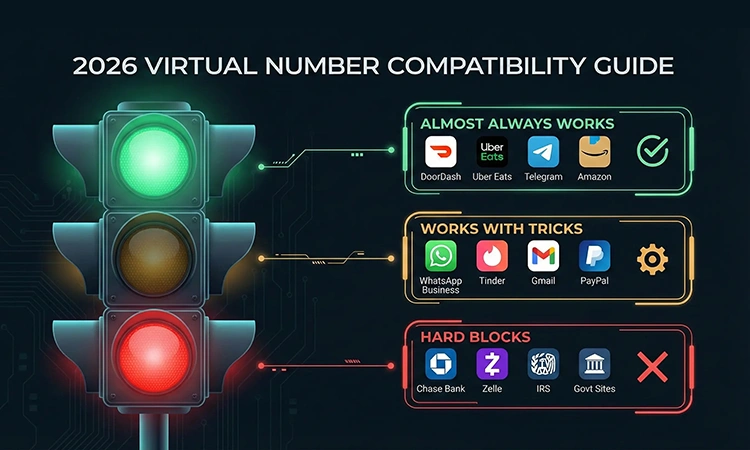
But not all apps are the same. After testing thousands of verifications, we’ve built the definitive “Traffic Light” guide to what actually works in 2026.
The Compatibility “Traffic Light” System
We categorized the most popular apps based on how strict their security filters are.
🟢 Green Light (Almost Always Works)
These platforms prioritize getting new users over strict security. A clean, private number from SecondLineNumber works here 95% of the time.
- Gig Economy: DoorDash, Uber Eats, Lyft (Rider accounts).
- Social & Messaging: Telegram, Discord, Signal (mostly), Email Newsletters.
- Shopping: Amazon, eBay, Shopify stores, Loyalty programs.
- Why it works: These companies just want to verify you are a human, not a bot. They generally don’t block VoIP numbers unless the specific number has been used for spam before.
🟡 Yellow Light (Works… If You Know The Tricks)
This is the tricky zone. These apps hate free burner numbers but often accept paid, permanent virtual lines if you use the “Voice Call” method (more on that below).
- WhatsApp Business: This is the #1 request. It works, but you often need a fresh number and must avoid SMS verification.
- Google / Gmail: They have a strict “one number, roughly 4-5 accounts” limit.
- Dating Apps: Tinder, Bumble, Hinge. They are aggressive against bots. If your number gets flagged here, it’s usually because the IP address of your phone didn’t match the location of the number.
- PayPal: Hit or miss. Often works for login 2FA, but might fail for initial account creation.
🔴 Red Light (The Hard Blocks)
I’m going to be real with you because I don’t want you to waste your money. If a service demands a “Non-VoIP Mobile-Coded” number, no virtual app in the world can guarantee 100% success.
- Big Banks: Chase, Wells Fargo, Bank of America. (Small credit unions are sometimes okay).
- Strict Fintech: Zelle, CashApp (sometimes), Venmo.
- Government: IRS websites, Social Security.
For these specific services, we always recommend using your primary SIM card. The security risk they are managing is simply too high for virtual lines.
Why “Free” Numbers Fail (The Freshness Factor)
You might be wondering, “Why did my friend’s virtual number work, but my free TextNow/Google Voice number failed?”
The answer is Reputation Score.
Free apps recycle their phone numbers aggressively. That number you just got for free? It was probably used by 20 other people last year. One of them might have spammed WhatsApp groups or got banned from Tinder.
When you try to use it, the app sees the number’s “dirty” history and blocks you immediately.
At SecondLineNumber, we cycle our inventory differently. We aim for “fresh” numbers that haven’t been burned by spammers. That’s the difference between a paid private line and a free public one.
3 Pro Tricks to Bypass “VoIP Detection”
If you are stuck at a “Yellow Light” app, don’t give up. Try these three methods before you quit.
1. The “Call Me” Override (Critical for WhatsApp)
This is the most common mistake users make.
- The Problem: You hit “Send SMS Code.” The code never arrives. You click it again. Still nothing.
- The Fix: Many servers block the SMS route for virtual numbers but leave the Voice route open.
- How to do it: Request the code. Wait for the 60-second timer to run out. Do NOT click “Resend SMS.” Instead, look for the option that says “Call Me” or “Receive a Call.”
- Pick up the call in the SecondLineNumber app, and a robot will read the code to you. This works roughly 70% of the time when SMS fails.
2. The “Clean IP” Rule
Security bots aren’t just looking at your phone number; they are looking at you.
If you are trying to verify a US number (+1) for WhatsApp, but your phone’s IP address says you are currently in Vietnam or Nigeria, the system flags it as fraud.
- The Fix: Turn off your VPN if it’s on a weird location, or ensure your IP roughly matches the region of the number you bought.
3. Profile “Warm-Up”
Don’t try to verify a brand new number on 10 apps in 10 minutes. That looks like bot behavior. Verify one major account (like Google), let it sit for a few hours, and then try the next.
(Note: If you are having trouble, check our Support Guide for troubleshooting tips.)
Summary: Don’t Risk Your Account
Verification is a trust game. If you use a recycled, free number, you are starting with zero trust.
If you need a line for business, dating, or gig work, get a private number that belongs only to you. It’s the single easiest way to stop seeing “Invalid Number” and start getting your codes.